Gke Access Management With Kubernetes Rbac
Lately, I have been working on setting up proper accesses for our GKE (Google Kubernetes Engine) cluster. There are 2 options for controlling access within GKE cluster - GCP Identity and Access Management (IAM) and Kubernetes role-based access control (RBAC).
GCP IAM - allows managing permissions to GCP resources, however when it comes to GKE it becomes a bit limited in its granularity. For example, you could assign a Kubernetes Engine Viewer role to a user to give view permissions to Kubernetes resources, but you can’t limit it to a specific namespace.
Kubernetes RBAC - allows managing permissions to objects within Kubernetes cluster, it is a great option if you need to assign fine-grained permissions, i.e., limit view access only to pods within specific namespace.
We had the following requirements:
- Users should be able to view and manage resources only within their namespace
- Accesses should be easy to maintain - if you need to add/remove permissions for a user, it should be enough to add/remove that user from a list
- Should be automated (no one likes manual work…)
Implementation
As we needed more granular control, we decided to create a custom GCP IAM role, which would grant minimal required GKE permissions and then leave the rest of access management to Kubernetes RBAC. We took the following steps:
- Use Terraform for automation
- Create a YAML file with list of users
- Create and assign a custom GCP IAM role
- Create Kubernetes Role and RoleBinding objects
Note: I won’t be describing how to set up Terraform providers in this post, and will assume that you already have them. For convenience, we will have all Terraform resources described in one *main.tf file.*
Creating a YAML file
As Google Groups were not an option, we decided to hold the list of users in a YAML file (users.yaml):
first.user@gmail.com: ["default", "backend", "frontend"]
second.user@gmail.com: ["frontend"]
third.user@gmail.com: ["backend"]
As you can see, the format is pretty simple: users_email: [list of namespaces to grant access to], it allows us to easily add or remove users, as well as effortlessly control which namespaces they can access. We will be using yamldecode to read this information in Terraform:
locals {
  users = yamldecode(file("users.yaml"))
}
Creating and assigning custom GCP IAM role
As per GKE docs at minimum users require container.clusters.get permission, so users could authenticate with a cluster. We also decided to add container.clusters.list to allow users to list those clusters.
resource "google_project_iam_custom_role" "gke_minimal_permissions" {
  role_id     = "minimalGKEPermissions"
  title       = "Minimal GKE permissions"
  permissions = ["container.clusters.get", "container.clusters.list"]
  project     = "project-name"
  description = "This role provides minimal GKE permissions"
}

resource "google_project_iam_member" "gke_minimal_role" {
  for_each = local.users

  member  = "user:${each.key}"
  role    = google_project_iam_custom_role.gke_minimal_permissions.name
  project = "project-name"

}
Create Kubernetes Role and RoleBinding objects
Finally, we needed to create Role and RoleBinding objects.
Role Object - is a set of permissions within a specific namespace.
RoleBinding Object - allows you to grant permissions of a Role object to list of Kubernetes subjects (users, groups, service accounts).
Knowing above, we had to ensure that a Role would be created in all namespaces and that a RoleBinding would assign a Role in a correct namespace. For that, we had to format the input from users.yaml file:
locals {
  users      = yamldecode(file("users.yaml"))
  namespaces = ["default", "frontend", "backend"]
  members = flatten(
    [for k, v in local.users :
      [for ns in v :
        { user = k, namespace = ns }
      ]
    ]
  )
}
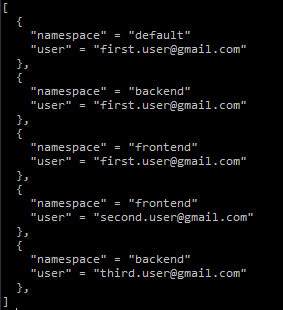
We loop through every user and then loop again through every namespace assigned to a user to create a list of objects in format:
{
  "namespace" = "namespace_name"
  "user"  = "users_email"
}
flatten() function creates one list from multiple lists and is critical here, as without it, we would just have a list of list of objects, which would be of no use for us. With our users.yaml file, the output would be:
Having data in a format we can use, we can finally create Role and RoleBinding objects (we will be granting view permissions for all resources in namespaces that are assigned to a user):
resource "kubernetes_role" "resource_viewer" {
  for_each = toset(local.namespaces)

  metadata {
    name      = "resource-viewer"
    namespace = each.key
  }

  rule {
    api_groups = [""]
    resources  = ["*"]
    verbs      = ["get", "list", "watch"]
  }
}

resource "kubernetes_role_binding" "resource_viewer_users" {
  for_each = { for member in local.members : "${member.user}-${member.namespace}" => member }

  metadata {
    name      = "resource-viewer-user"
    namespace = each.value.namespace
  }

  role_ref {
    api_group = "rbac.authorization.k8s.io"
    kind      = "Role"
    name      = kubernetes_role.resource_viewer[each.value.namespace].metadata[0].name
  }

  subjects {
    api_group = "rbac.authorization.k8s.io"
    kind      = "User"
    name      = each.value.user
  }
}
Few things to note
for_each = toset(local.namespaces) we are converting a list to a set, so we could use for_each instead of count. It is important for setting correct Role name when creating a RoleBinding.
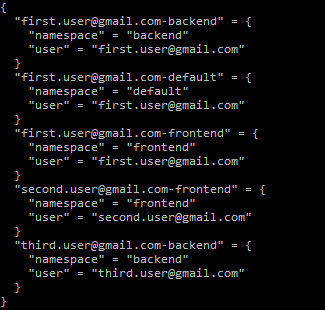
for_each = { for member in local.members : "${member.user}-${member.namespace}" => member } from our formatted data we are creating a new object, so we could access required fields. "${member.user}-${member.namespace}" => member this part specifies how the new object key => value should look. With our data, we have:
Complete main.tf
locals {
  users      = yamldecode(file("users.yaml"))
  namespaces = ["default", "frontend", "backend"]
  members = flatten(
    [for k, v in local.users :
      [for ns in v :
        { user = k, namespace = ns }
      ]
    ]
  )
}

resource "google_project_iam_custom_role" "gke_minimal_permissions" {
  role_id     = "minimalGKEPermissions"
  title       = "Minimal GKE permissions"
  permissions = ["container.clusters.get", "container.clusters.list"]
  project     = "project-name"
  description = "This role provides minimal GKE permissions"
}

resource "google_project_iam_member" "gke_minimal_role" {
  for_each = local.users

  member  = "user:${each.key}"
  role    = google_project_iam_custom_role.gke_minimal_permissions.name
  project = "project-name"

  depends_on = [google_project_iam_custom_role.gke_minimal_permissions]
}

resource "kubernetes_role" "resource_viewer" {
  for_each = toset(local.namespaces)

  metadata {
    name      = "resource-viewer"
    namespace = each.key
  }

  rule {
    api_groups = [""]
    resources  = ["*"]
    verbs      = ["get", "list", "watch"]
  }
}

resource "kubernetes_role_binding" "resource_viewer_users" {
  for_each = { for member in local.members : "${member.user}-${member.namespace}" => member }

  metadata {
    name      = "resource-viewer-user"
    namespace = each.value.namespace
  }

  role_ref {
    api_group = "rbac.authorization.k8s.io"
    kind      = "Role"
    name      = kubernetes_role.resource_viewer[each.value.namespace].metadata[0].name
  }

  subjects {
    api_group = "rbac.authorization.k8s.io"
    kind      = "User"
    name      = each.value.user
  }
}
Final words
GCP IAM is a great tool to manage GKE permissions, if you do not need fine-grained control, however if more precise permissions are required, Kubernetes RBAC is the way to go. As seen above, Kubernetes RBAC can be easily managed in an automated way with Terraform.